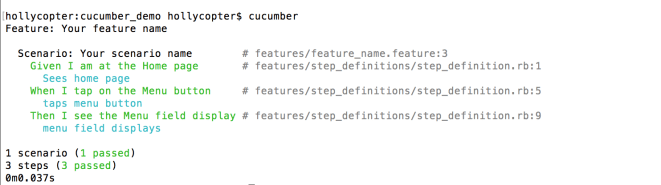
Keeping the code DRY and readable with cucumber and ruby

This post is to detail some basic strategies to keep test code DRY (Do not Repeat Yourself) in order to reduce code duplication & ensure that code is easy to maintain. Additional notes are provided to ensure that feature files can contain readable steps, without needing to create unnecessary step definitions to drive them.

The code examples are provided for Cucumber/Gherkin with Ruby.

Some of the information provided is based upon The Cucumber Book & Cucumber and Cheese. Refer to the Cucumber website, for all things Cucumber & Gherkin related!

Use Arguments in feature files & step definitions

Make use of arguments in order to reduce duplication of code in step definitions.

Feature file

As per the code block below, arguments can be marked by use of quotation marks:

When I select "Shows" from the left menu
When I select "Statistics" from the left menu
Then I select "Movies" from the left menu
Then I select "Settings" from the left menu

Step definitions

The 4 test steps above can be handled by a single step definition that makes use of regular expression to match to any given argument. Be sure to provide a meaningful name to the variable that is relevant for all scenarios for easy test maintenance.


When(/^I select "([^"]*)" from the left menu$/) do |menu_item|

Improve step readability by matching step definitions to multiple keywords in a feature file

Using this approach, nothing in particular needs to be handled in the feature file.

Given I am at the Home screen

Make use of parenthesis and pipe to handle multiple keywords in the step definitions:

Given(/^(?:I|They) (?:are|am) at the Home screen$/) do

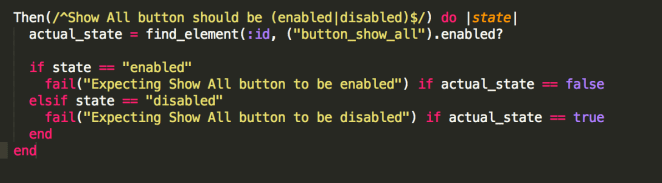
This technique can also be used to handle verification of boolean conditions, such as:
screen-shot-2016-10-10-at-12-01-46-pm

Modify the regular expression to match to part of a step, to allow for more natural language

Step definitions normally use ^$ to match to the full test step in the feature file (as above).

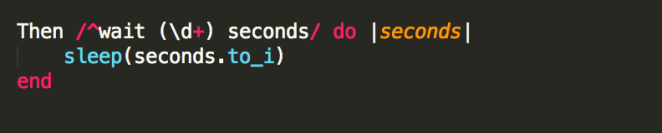
But as recommended by Cory Shires, in some instances, it can allow for more expressive language in your test steps if you match your step definition to only the beginning of a test step. Eg,
screen-shot-2016-10-10-at-12-43-42-pm

Can match to both:

screen-shot-2016-10-10-at-12-44-40-pm

In this case, anything after seconds, is written in the test step for readability only.

Make use of compounded test steps

If you find yourself repeating your test steps in your feature files for common processes, you can reduce the ‘noise’ by compounding the test steps in the step definitions.

For example, when I find myself constantly repeating the steps below:

screen-shot-2016-10-10-at-1-02-02-pm

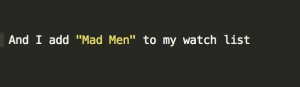
Then I can write this as a compounded step in my feature file:
screen-shot-2016-10-10-at-1-05-39-pm

And I can specify that the matching step definition contains the sub steps, as follows:
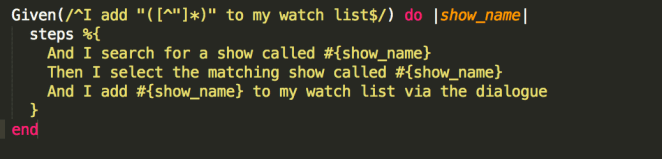
screen-shot-2016-10-10-at-1-11-41-pm

Specification by design

Scenario Outline

TBC.
Cucumber basics for an Android, Appium & Cucumber test project

From writing the first lines of a cucumber test case to best practice tips, this post makes note of some techniques that can be used in any cucumber testing project.

Some of the information within is based upon The Cucumber Book & Cucumber and Cheese. Refer to the Cucumber website, for all things Cucumber & Gherkin related!

Prerequisite: Test project is configured with cucumber installed. Please see guide to setting up test framework for Android, Appium, Cucumber, Ruby

Background

Cucumber is a tool that supports Behavioural Driven Development (BDD) practices. It provides the ability to specify a system’s behaviour in plain English text, making the test scripts human readable on the highest level of abstraction. Cucumber focuses on the end user experience, and the style of writing tests allows for reusability & scalability.

Cucumber / Ruby framework file structure

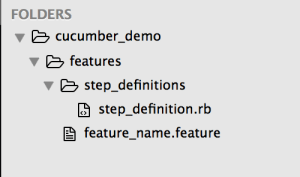
Note that there are Ruby gems which can create this file structure automatically. For reference purposes, the basic file structure that a cucumber/ruby project requires is:

screen-shot-2016-10-05-at-3-07-28-pm 

Once the test project contains the basic file structure, if you execute: cucumber command at your test project’s root directory, you can verify that your cucumber project is configured correctly when output that includes the number of scenarios and steps is returned.

screen-shot-2016-10-05-at-3-17-40-pm

1st Cucumber Scenario

Inside the features folder, multiple .feature files can be created, grouped according to system features.

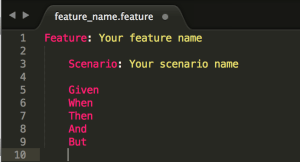
Using the Gherkin language, each test case can be written according to the syntax provided below. The words in pink font are reserved words in Cucumber/Gherkin.

screen-shot-2016-10-05-at-3-26-23-pm

The Feature represents features within the system under test.

The Scenario represents the requirement, such as a business rule. Effectively, these represent test cases.

The test case steps can be written using the Gherkin reserved words:

Given – the pre-requisite

When – the action

Then – the outcome

And & But – these reserved words are used to make the steps more readable.

The test case steps are later defined in step definition files, to enable the tests to interact with the system’s code base.

By separating the feature files and step definition files, the test cases remain human readable, and the step definitions (and page object files) become the go-to place for maintaining the test cases when the code base changes.

Note that the keyword (Given, When, Then, And, But) does not actually effect your test step. Example:

When I click on the home button

&

Then I click on the home button

These two steps operate exactly the same when the test is executed. The keyword is only used for human readability of the test steps, but is ignored when the test case is executed. So in this case, only one step definition is required.

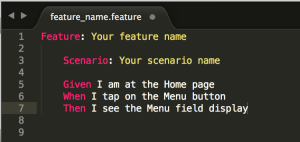
Example of a completed Cucumber feature:

screen-shot-2016-10-05-at-3-51-26-pm

Generate Ruby step definition snippets

The next step to creating a cucumber test, is to define the steps of a feature, by associating them to the system under test’s code base, via the step definition files.

When the cucumber command is executed, 2 things will happen: 

  1. test cases will be executed
  2. step definition snippets will be created for any feature that does not have step definitions defined

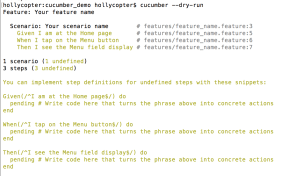
To generate step definition snippets (without executing test cases), run:

cucumber –dry-run

The result will return snippets of code that can be copy/pasted into the corresponding step definition files. Example: 

screen-shot-2016-10-05-at-3-53-40-pm

See the automatically generated Ruby script!?

Define Ruby Step Definitions

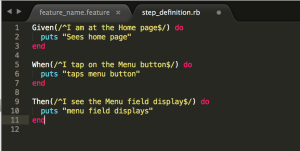
Using the step definition snippets, enter Ruby code into the methods, in order to drive a test case.

Example: (Ruby commands to print information to log file have been added to the step definition file)

screen-shot-2016-10-05-at-3-59-12-pm

To execute the test case:

cucumber

And the result will be: 

screen-shot-2016-10-05-at-4-01-16-pm

Here, you can see the result of the print commands, along with the test case results and test execution time.

This demonstrates the basic concepts for Cucumber test creation. However, in order to drive a test against the code base for an Android/Appium/Cucumber project, we need to enter Ruby/Appium steps into the step definitions so that we can integrate with the code base.

Implement step definitions for Appium with Ruby

In order to interact with the Android native application code base (for SeriesGuide) application, using Appium, we need to enter step definitions that locate elements using the Appium locators & selenium commands. This information will be provided in a separate post. 

Keeping the Cucumber code DRY

Various techniques can be used in Cucumber to keep the code ‘DRY’ (Do Not Repeat Yourself!).
These techniques will be covered in a separate post.